
Cams.com Guide
Full Review & How It Works
In our testing, we found Cams.com to be one of the more straightforward and cleaner cam platforms currently online. Instead of overwhelming users with constant popups, endless rankings, and heavily layered menus, the platform keeps most of the experience focused directly on live rooms, private interaction, and performer discovery.
In this guide, we break down how the platform works, including model browsing, categories, private shows, pricing, platform features, and overall user experience.
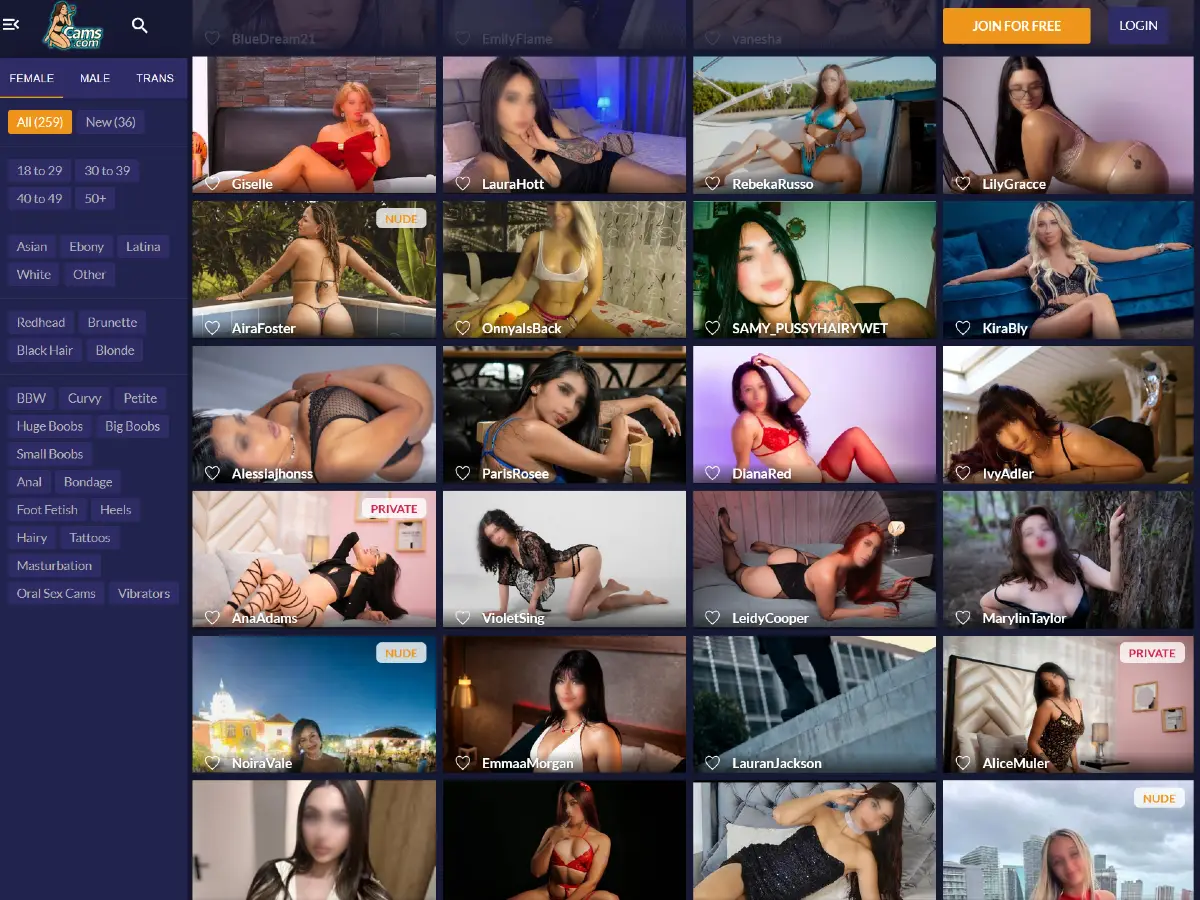
How Cams.com Works
The site works as a live cam platform built around model discovery and private interaction. Users can browse the main performer grid, filter models by category and profile traits, open live rooms, add favorites, and use tokens for premium features.
In our testing, we found the platform surprisingly straightforward compared to other cam sites. Instead of relying on endless menus or complicated ranking systems, Cams.com focuses on direct browsing, live performer thumbnails, private shows, and room labels that help users understand what type of session is currently available.
Most of the experience starts from the homepage grid, where users can see live models, room status labels, and basic discovery tools. From there, users can enter free preview areas, follow favorite performers, join paid sessions, or explore private and exclusive show options.
Creating a Free Account and Age Verification
When first accessing the platform, users are greeted with a standard 18+ warning screen informing visitors that the site contains sexually explicit material.
Open Cams.com in a new tab to follow along.

After continuing, the platform encourages visitors to create a free account using a username, email address, and password. During our testing, new account registration also included an offer for 100 free tokens applied toward a user’s first token purchase. We also noticed that users can skip the registration process and continue browsing without creating an account.

The registration screen also highlights several member benefits, including unlimited chat with models, direct interaction during private shows, favorite model tracking, access to additional adult content, and the ability to join performer fan clubs.
Users who create an account must also verify their email address by clicking a confirmation link sent to the registered email account before accessing the full platform experience.
During additional testing performed using a United States IP address, we also encountered a separate age verification prompt while accessing certain areas of the platform. The verification system, powered by Yoti, offered two verification methods including facial age estimation or ID verification using a passport, driver’s license, or national ID.

Create a Free Cams.com Account to explore the platform features.
Homepage Layout and Finding Models
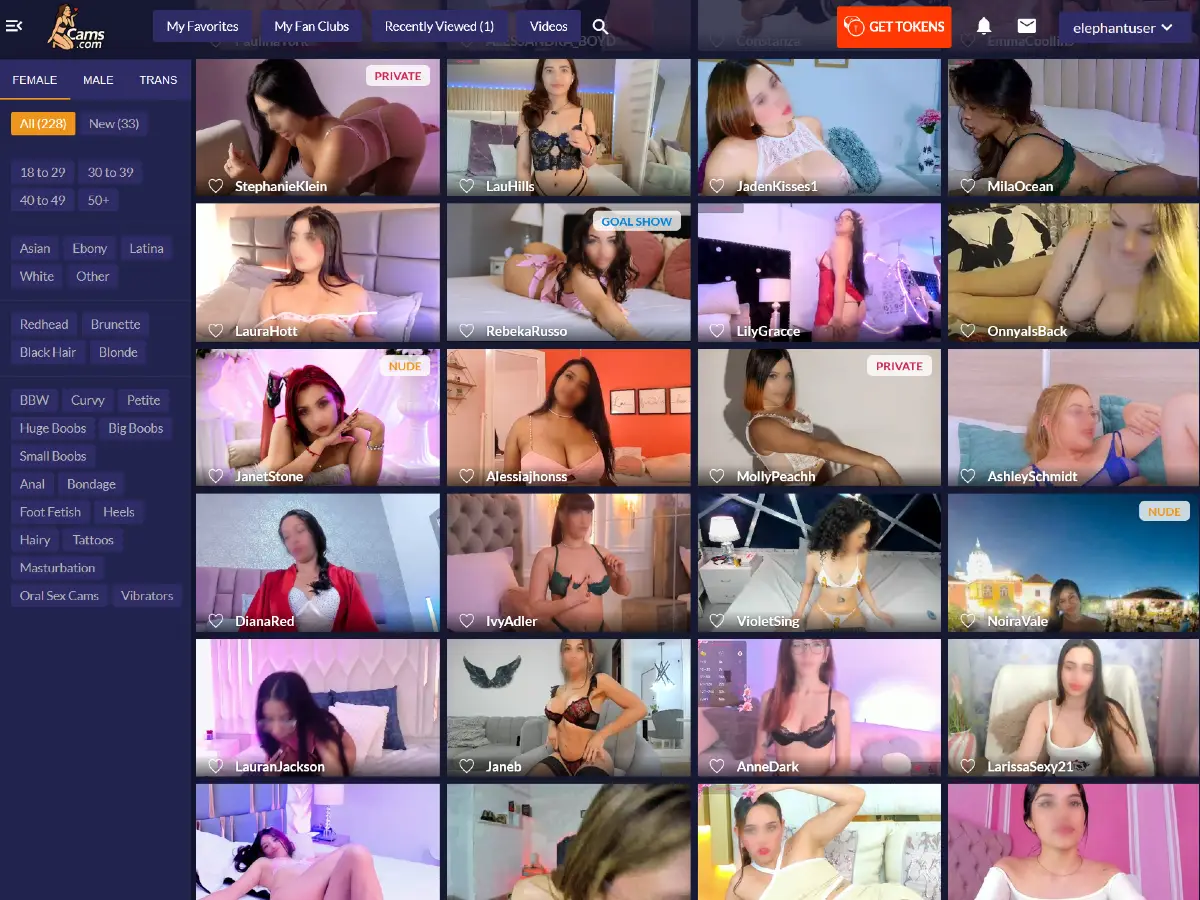
The homepage is built around a live performer grid, with model thumbnails taking up most of the screen. Each thumbnail shows the performer name, a favorite icon, and in some cases room labels such as PRIVATE, GOAL SHOW, EXCLUSIVE, or NUDE.
The left side menu gives users a simple way to browse Female, Male, and Trans performers, along with filters for age, ethnicity, hair color, and category tags. The menu can also be collapsed, creating a cleaner full grid view focused almost entirely on live models and active rooms.
The homepage also includes quick access to Favorites, Fan Clubs, Recently Viewed models, Videos, and a search icon across the top navigation area. The overall layout feels simple, direct, and focused more on performer discovery than heavy navigation.
Visit our in-depth Cams.com Models Guide for a closer look at filters, room labels, search tools, and live cam girl discovery.
Inside a Cams.com Live Room
Inside a live room, the platform continues the same lightweight and direct design philosophy seen across the rest of the site. The main video feed takes up most of the screen, while the chatroom and interaction tools remain positioned along the right side of the interface.
During our testing, the live room experience remained surprisingly clean and easy to navigate compared to many cam sites filled with excessive overlays, alerts, and layered menus.

The live room interface includes controls for video quality, audio volume, Theater Mode, emojis, tipping features, and private interaction tools. Users can also join fan clubs, send virtual gifts, purchase tokens, and access one on one private sessions directly from the room interface.
Visit our detailed Cams.com Live Rooms Guide for a closer look at chat features, private shows, tipping systems, and interaction tools.
Cams.com Tokens and Pricing
Like most cam platforms, Cams.com uses a token based system for tipping, private shows, interactive features, and premium room access. Users purchase token packages directly through the platform and then spend those tokens during live interactions with performers.
During our testing, we found the platform noticeably less intrusive than many competing cam sites when it came to pushing token purchases. While token offers remain visible throughout the interface, the overall experience felt cleaner and less aggressive compared to platforms filled with constant purchase popups and oversized upgrade prompts.
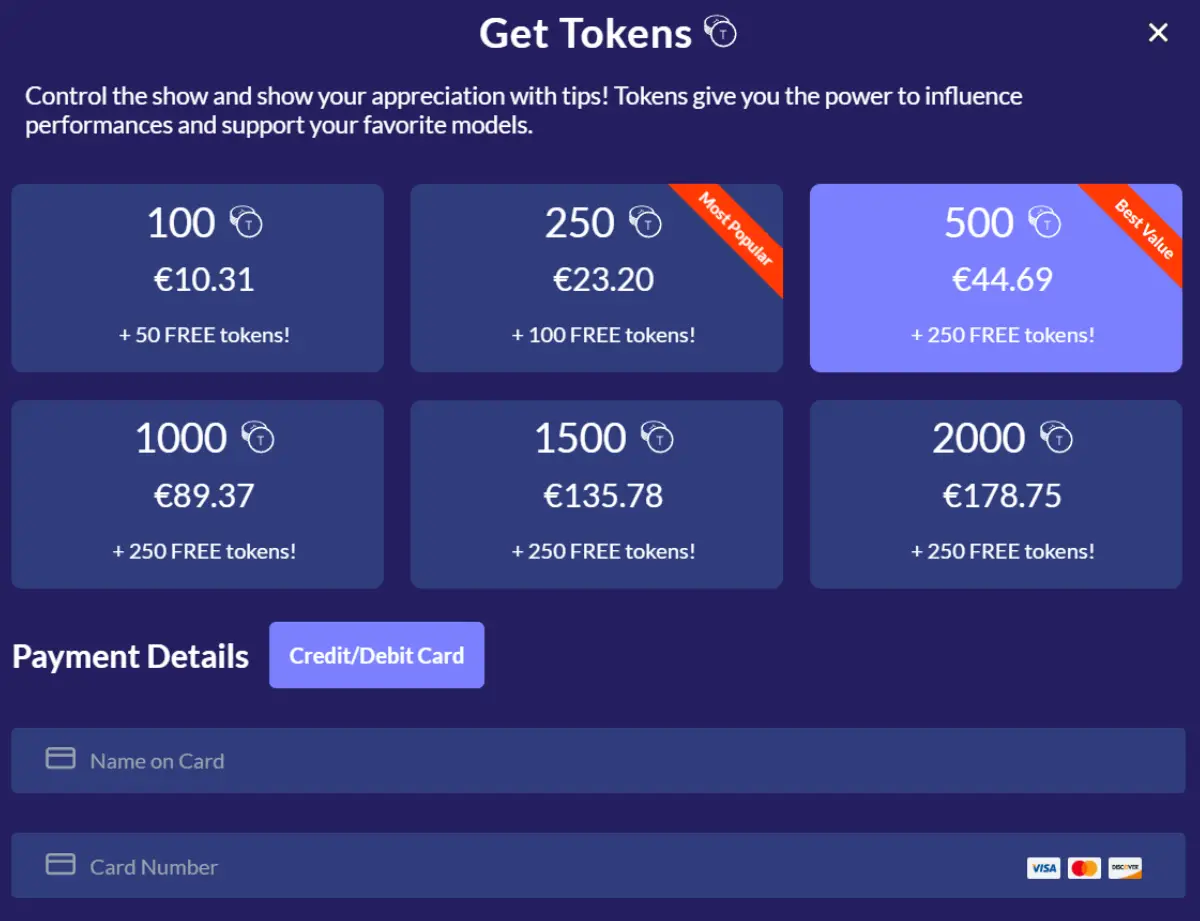
At the time of our testing, available token packages ranged from 100 tokens up to 2000 tokens, with larger purchases including additional bonus tokens. The platform also highlighted “Most Popular” and “Best Value” package recommendations directly inside the purchase window.
In our testing using a United States IP address, the only visible payment method available was Credit/Debit Card.
Token spending varies depending on the type of interaction, performer pricing, private shows, tipping menus, and premium room features selected by the user.
Visit Cams.com to explore token packages and check for current promos.
Is Cams.com Worth It?
Whether the experience feels worth it largely depends on what users expect from a cam platform.
For users looking for a simpler and more direct platform focused on private interaction, lightweight browsing, and cleaner live room layouts, we found the overall experience surprisingly solid during our testing.
The platform may not offer the massive discovery systems, endless rankings, or highly layered ecosystems found on most other cam sites. At the same time, that simplicity also makes the experience feel faster, less distracting, and easier to navigate.
From a time perspective, the platform feels efficient to browse and relatively easy to learn. From a pricing perspective, token purchases and premium features remain fairly standard for the industry, although we found the platform noticeably less aggressive when pushing upgrades and token sales compared to many competing cam sites.
Is Cams.com Legit?
Cams.com is a legitimate and long established cam platform that has been operating online since the late 1990s. The site includes a large live performer ecosystem, functioning payment systems, and active private interaction features.
The platform has been operating for decades and includes many of the standard systems commonly found on established cam sites, including account verification, token purchases, private shows, fan clubs, tipping tools, and age verification processes.
During our testing, we were able to browse live rooms, create accounts, access performer profiles, test interaction systems, and navigate the platform without encountering obvious technical problems or misleading behavior.
Like most adult platforms built around live interaction and token purchases, users should still browse carefully, manage spending responsibly, and understand that individual room experiences can vary depending on the performer and type of session.
Cams.com Pros and Cons
Pros
- Cleaner and more straightforward interface compared to many modern cam platforms
- Strong focus on private interaction and one on one sessions
- Lightweight live room design without excessive overlays and popups
- Simple performer discovery system with filters and room labels
- Long established platform operating since the late 1990s
- Includes fan clubs, private shows, Cam2Cam, tipping tools, and interactive features
- Less aggressive token purchase prompts compared to many competing cam sites
Cons
- Smaller discovery ecosystem compared to other cam platforms
- Fewer advanced browsing systems and category layers
- Some areas of the platform may require age verification depending on user location
- Limited visible payment methods during our testing with a United States IP address
- Live room audience numbers are not visible directly from the homepage thumbnails
The Good, The Bad & The Ugly
The platform may feel somewhat simpler compared to larger cam ecosystems filled with advanced discovery systems and massive category structures. At the same time, that simplicity also makes browsing feel faster, lighter, and easier to navigate for users primarily interested in entering live rooms and interacting directly with performers.
We also found the onboarding process relatively smooth overall, with account creation, token purchases, and room navigation remaining easy to understand throughout the platform.
For users looking for a more direct cam site experience centered around private shows, live interaction, and lightweight browsing, Cams.com still holds up surprisingly well.
Visit Cams.com to explore the platform.