
Cams.com Models
How to Find Cam Girls & Live Rooms
In our testing, we found the Cams.com interface surprisingly simple, but that simplicity actually works well. Instead of filling the screen with endless menus, rankings, and distractions, the platform keeps the main focus on the models themselves and makes browsing feel more direct.
The platform does not rely heavily on complex ranking systems, layered discovery tools, or endless navigation menus. Instead, the experience feels more direct and lightweight, with most browsing happening directly from the main performer grid.
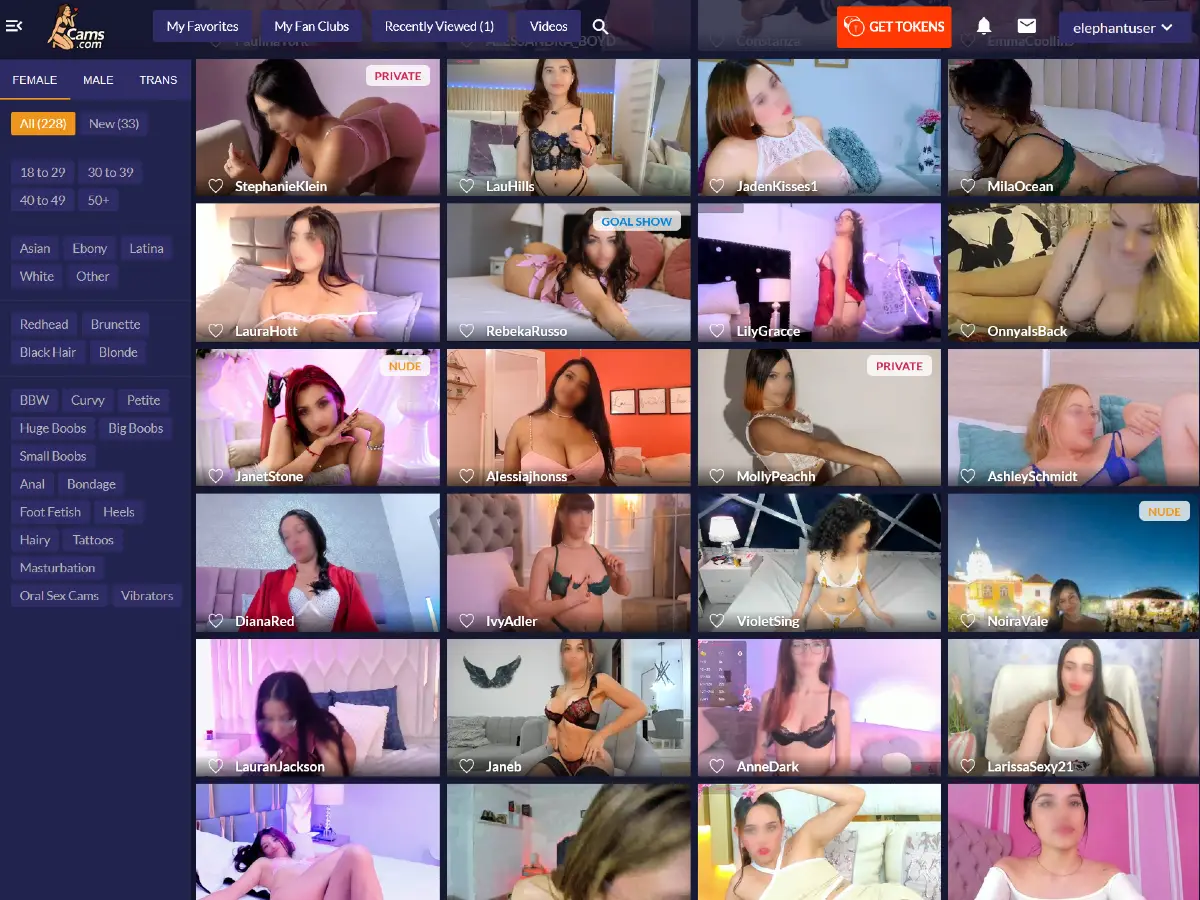
Finding Models on Cams.com
The main discovery system is built around a compact left side filter menu that allows users to narrow performers by gender, age range, ethnicity, hair color, and category tags.
At the top of the sidebar, users can quickly switch between Female, Male, and Trans performers. Just below that, the platform displays simple browsing counters such as All and New, making it easy to immediately see how many performers are currently listed in each section.
Additional filters underneath allow users to narrow results by appearance and profile traits, including age, ethnicity, hair color, and category preferences. The layout stays intentionally minimal compared to many other cam sites, helping the browsing experience feel faster and less cluttered.
The platform also includes features such as Favorites, Fan Clubs, Recently Viewed models, and a dedicated Videos section across the top navigation bar. These additions help make performer discovery feel more personalized without overwhelming the interface with excessive menus or complicated ranking systems.
The browsing experience still feels surprisingly clean and straightforward overall. A small magnifying glass icon in the upper left corner opens the platform’s search feature, allowing users to quickly search for performer names or keywords without dealing with complicated navigation.
Right beside it, a compact three line menu button allows users to collapse the entire sidebar filter system, creating an even cleaner interface focused almost entirely on the live performer grid.
For a complete overview of the platform, see our Full Cams.com Guide.
Featured Models & Live Performer Grid
One of the most noticeable aspects of Cams.com is how much of the experience revolves around the live performer grid itself. Once the sidebar menu is collapsed, the interface becomes extremely focused on the models, with very little visual clutter competing for attention.
Each thumbnail displays the model name along the bottom area together with a small heart icon that allows users to quickly add performers to their Favorites list. During browsing, hovering the mouse over certain rooms also allows users to mute or enable live room audio directly from the grid without entering the room itself.

The platform also uses several live room labels that appear directly on performer thumbnails.
- NUDE labels identify premium rooms that require paid access to continue viewing and chatting.
- PRIVATE indicates that the model is currently in a private session, although users can still pay tokens to use the “Take a Peek” feature.
- GOAL SHOW identifies rooms where viewers must collectively tip toward a specific target or activity.
- EXCLUSIVE appears on one on one private shows where the model is interacting privately with a single viewer and no other users are allowed access to the room.
In our testing, we found the overall grid of cam girls and live performers very clean and easy to browse. One detail we did miss, however, was the lack of visible room audience numbers directly on the thumbnails. Some users may prefer seeing how many viewers are currently inside each live room before clicking into a session.
Searching for Specific Performers
The platform includes a simple built in search feature that allows users to quickly look up performers directly from the main interface. The search tool appears to work best for finding specific model names or matching profile keywords rather than acting as a large category discovery system.
This fits naturally with the platform’s overall browsing style, which focuses more heavily on scrolling through the live performer grid and using the sidebar filters to discover active rooms.
For users who already know a performer’s username or part of a model name, the search feature offers a fast and lightweight way to jump directly into a room without navigating through multiple menus or pages.
Visit Cams.com to browse live performers, explore categories, and search for specific models.