
LiveJasmin Girls Categories
Filters, Tags & Full Guide
LiveJasmin uses a layered browsing system that helps users narrow down performers through categories, filters, tags, show types, appearance options, fetishes, and regional preferences instead of relying on simple performer lists alone.
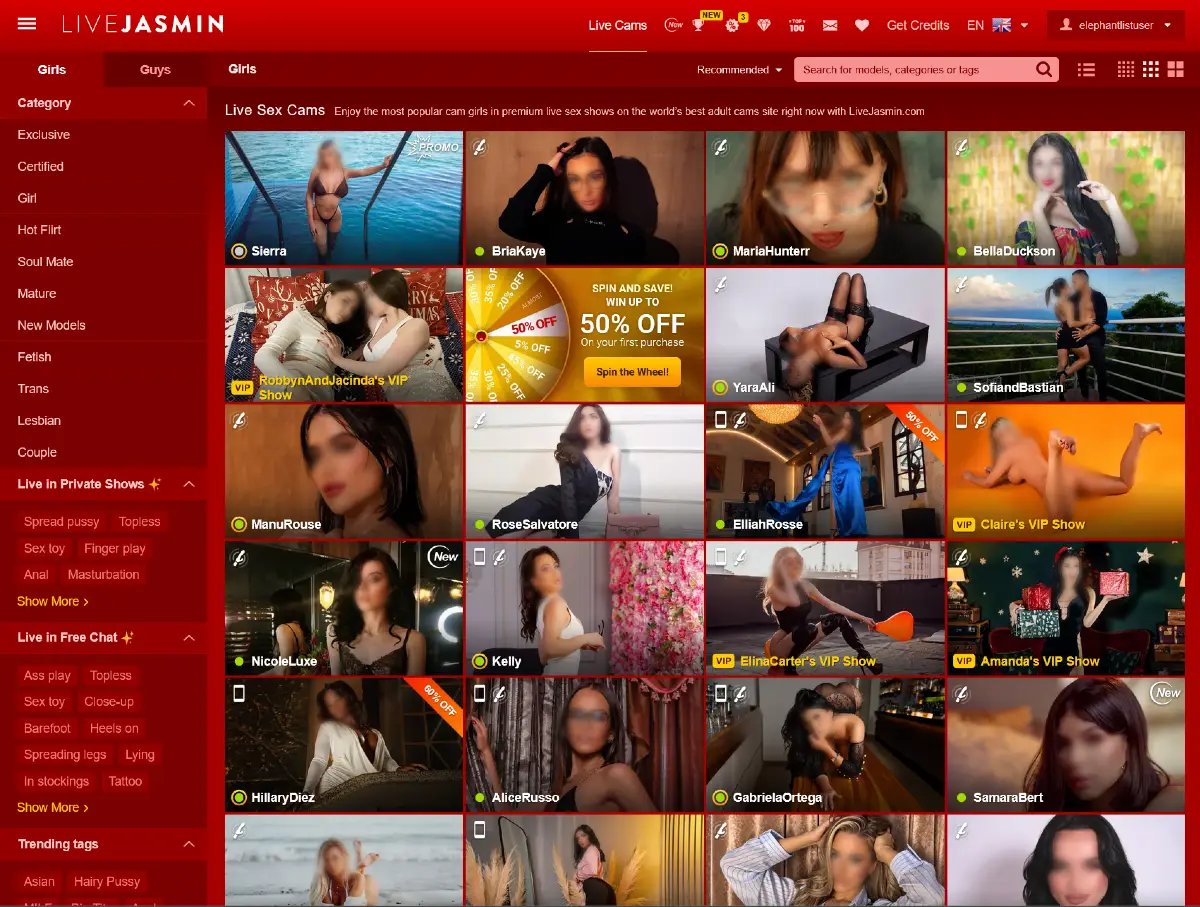
This page focuses on the LiveJasmin Girls Categories section, including the main homepage filters, private show tags, free chat browsing options, and trending category labels available throughout the platform.
Users looking for male performers can also explore the LiveJasmin Guys Categories page for a separate breakdown of filters and browsing options available in the Guys section.
For a complete overview of the platform, including features, pricing, account options, and live room experience, see our complete LiveJasmin review.
Main Girls Categories
On the left side of the LiveJasmin homepage, the platform displays a large sidebar filled with categories, filters, tags, and advanced browsing options. This sidebar acts as the core discovery system for the Girls section and helps users narrow performers based on show style, appearance, fetishes, interaction preferences, and many other traits.
The main Girls Categories section functions as the first browsing layer inside this sidebar. Instead of displaying one massive list of performers, LiveJasmin separates models into multiple discovery paths based on relationship style, show atmosphere, popularity, and performer type.
Some categories are designed around performer identity, including Girl, Mature, Trans, Lesbian, and Couple. Others focus more on presentation style or user experience, such as Exclusive, Certified, Hot Flirt, Soul Mate, New Models, and Fetish. This creates a more personalized browsing system compared to traditional cam site directories.
The Exclusive and Certified sections generally highlight verified or premium-style profiles, while New Models helps users discover recently added performers. Categories like Mature, Fetish, and Couple allow users to narrow down specific interests before applying deeper filters later in the browsing process.
These category shortcuts also work together with LiveJasmin’s additional filtering system, including private show tags, appearance filters, regional preferences, languages, and fetish-related options available throughout the sidebar.
Live in Private Shows
Below the main Girls Categories, the LiveJasmin sidebar includes a dedicated section for performers who are currently active in private shows. These filters help users discover models based on specific show styles, interaction preferences, and adult themes happening in real time.
Some of the most visible private show filters include categories related to topless performances, sex toys, finger play, anal content, masturbation, and various explicit interaction styles. Instead of browsing profiles individually, users can quickly narrow performers based on the type of private session they are interested in.
This section works as a shortcut into LiveJasmin’s premium private show ecosystem and is closely connected to the platform’s credit-based viewing system explained in our LiveJasmin pricing guide.
Live in Free Chat
The sidebar also includes a separate Live in Free Chat section focused on performers who are currently streaming publicly without requiring immediate private access. These filters are generally less restrictive and help users preview different models, appearances, outfits, poses, and interaction styles before entering paid sessions.
Common free chat tags include categories related to lingerie, stockings, tattoos, barefoot performances, glasses, close-up camera angles, heels, standing poses, and other visual presentation styles visible directly from public chat rooms.
This browsing system allows users to move through live rooms more efficiently while discovering performers that match specific visual preferences, fetishes, or interaction styles already active on the homepage.
Trending Tags
Further down the sidebar, LiveJasmin also highlights a rotating collection of trending tags designed to surface popular categories, performer styles, and currently active viewer interests across the platform.
These trending tags often include broad appearance-based filters, adult themes, body-type preferences, regional interests, and niche browsing shortcuts. Some examples visible on the homepage include Asian, MILF, Big Tits, Big Ass, Pregnant, German, Public, Squirt, Strap On, Anal, and Hairy Pussy.
Unlike the main Girls Categories, trending tags function more like fast-discovery shortcuts that help users jump directly into highly searched or currently active browsing themes without navigating through multiple filters first.
LiveJasmin also includes a “Show more” option within this section, leading to a larger tag directory with additional categories, fetishes, appearance filters, and specialized browsing options beyond the homepage selections.
Show Types
The LiveJasmin sidebar also includes a dedicated Show Type section that helps users filter performers based on how live interactions are delivered across the platform. These options focus less on performer identity and more on the viewing experience itself.
Some of the most visible show types include Free Chat, Private Chat, VIP Show, Video Call, and Mobile Live. Together, these categories allow users to move between public rooms, one-on-one sessions, premium private experiences, and mobile-focused broadcasts depending on how they prefer to interact with performers.
Additional filters such as Interactive Toy, Two-way Audio, Stories, and HD help narrow live rooms even further based on technical features, communication options, and streaming quality available during broadcasts.
This section becomes especially useful for users comparing different interaction styles before spending credits, since certain show types are designed for casual public browsing while others focus on more private or personalized sessions.
Price Filters
LiveJasmin also includes price-based filters inside the sidebar, allowing users to browse performers according to credit rates and promotional pricing ranges before entering private sessions.
One of the most visible shortcuts in this section is the Hot Deal category, which highlights performers offering discounted rates or temporary promotional pricing compared to standard private show costs.
The sidebar also separates performers into multiple price ranges, starting from lower-cost sessions and extending to premium categories reaching 9.99+ credits per minute. This allows users to filter live rooms based on budget, spending preferences, or the type of premium experience they are looking for.
These pricing filters work closely with LiveJasmin’s credit-based system and become especially useful for users comparing casual browsing sessions with higher-end private interactions available throughout the platform.
Willingness Filters
Another section inside the LiveJasmin sidebar focuses on willingness filters, which help users discover performers based on specific interaction styles, performance themes, and live show preferences.
These filters include categories related to ASMR, cosplay, POV-style interaction, striptease performances, twerking, close-up camera presentation, and other specialized show dynamics available during live broadcasts.
Some willingness tags also highlight more explicit adult activities and niche performance styles, including Deepthroat, Double Penetration, and Squirt, allowing users to narrow live rooms according to personal interests before entering private or premium sessions.
Unlike the broader Girls Categories section, willingness filters are designed to refine how performers interact on camera rather than focusing on appearance, identity, or relationship-based categories alone.
Fetishes
One of the largest sections inside the LiveJasmin sidebar is dedicated to fetish-related browsing. These filters allow users to narrow performers and live rooms based on specific kinks, domination dynamics, roleplay themes, clothing preferences, and specialized interaction styles.
The fetish category system includes a wide range of tags, including BDSM, Dominant, Submissive, Spanking, Roleplay, Latex, High Heels, Foot Fetish, Panty Fetish, Smoking, JOI, Chastity Training, Feminisation, Fetish Toys, Giantess, Cuckolding, Ball Busting, CBT, and several other niche themes available throughout the platform.
Some filters focus more on visual presentation and clothing preferences, while others are centered around power exchange dynamics, humiliation themes, domination roleplay, or specialized fetish interests commonly associated with cam-based performances.
LiveJasmin also separates broader adult categories such as Anal from more specialized fetish filters, creating a layered browsing system that allows users to move from general interests into highly specific fetish-related discovery paths inside the sidebar.
Languages
LiveJasmin also includes language-based filters inside the sidebar, allowing users to narrow performers according to spoken language and regional communication preferences during live sessions.
Some of the most visible language options include English, Spanish, German, French, and Italian. These filters help users discover performers who are more likely to communicate comfortably during free chat, private shows, video calls, and two-way audio sessions.
Language filters become especially useful on a global platform like LiveJasmin, where performers stream from multiple countries and interaction quality often depends on communication style, fluency, and personal comfort during live conversations.
Age Filters
The LiveJasmin sidebar also includes age-based browsing filters that help users narrow performers according to different adult age ranges and presentation styles.
Available categories include 18 - 22, 22 - 30, 30 - 40, and 40+ performers. These filters work as fast browsing shortcuts that allow users to move between younger performers, mature categories, and more experienced presentation styles without manually searching through multiple live rooms.
Age filters are commonly combined with other sidebar options such as appearance tags, language preferences, fetish categories, and private show filters to create a more personalized browsing experience across the platform.
Appearance Filters
LiveJasmin also includes a large appearance-based filtering system designed to help users narrow performers according to physical presentation, clothing style, body aesthetics, and visual preferences visible during live broadcasts.
Some of the most common appearance filters include Petite, Natural, Piercing, Shaved, Tattoo, Stockings, Gloves, Masks, Rubber, and Hairy Pussy. These tags allow users to quickly move between different visual styles and presentation themes already active throughout the platform.
Certain appearance filters focus on body features or fashion accessories, while others connect more closely to fetish-oriented browsing and roleplay presentation styles commonly associated with cam performances.
These appearance categories are frequently combined with age filters, fetish tags, private show preferences, and language selections to create a more personalized browsing experience inside the LiveJasmin sidebar.
Breast Size Filters
The LiveJasmin sidebar also includes breast size filters that help users narrow performers according to body proportions and visual presentation preferences during live broadcasts.
Available options include Small, Normal, Big, and Huge categories. These filters function as quick browsing shortcuts and are often combined with appearance tags, body type filters, fetish categories, and age ranges throughout the platform.
Like many other sections inside the sidebar, these filters are designed to simplify performer discovery and help users move through live rooms more efficiently based on personal visual preferences.
Build Filters
LiveJasmin also includes build-based filters that help users narrow performers according to overall body shape and physical presentation during live broadcasts.
Available categories include Skinny, Athletic, Medium, Curvy, and BBW performers. These filters provide another layer of visual customization inside the sidebar and are commonly combined with appearance tags, breast size filters, age ranges, and fetish-related browsing options.
By separating performers into multiple body-type categories, the platform allows users to move through live rooms more efficiently while focusing on specific presentation styles and personal preferences.
Height Filters
The LiveJasmin sidebar also includes height-based filters that allow users to narrow performers according to different physical proportions and body presentation styles during live broadcasts.
Available categories include performers under 5'1", between 5'1" and 5'3", between 5'3" and 5'7", and taller models above 5'7". These filters work as additional browsing shortcuts alongside body type, appearance, breast size, and fetish-related categories available throughout the sidebar.
Height filters help create a more detailed discovery system by allowing users to combine multiple visual preferences while browsing public rooms, private shows, and featured performers across the platform.
Hair Filters
LiveJasmin also includes hair-based filters that help users narrow performers according to hair color and hairstyle preferences during live broadcasts.
Available categories include Black Hair, Blonde, Brunette, Redhead, Long Hair, and Short Hair performers. These filters function as additional visual browsing shortcuts and are commonly combined with appearance tags, body type filters, age ranges, and regional preferences throughout the platform.
Hair filters help create a more personalized discovery experience by allowing users to quickly move between different presentation styles already active across public rooms, private sessions, and featured live streams.
Regional Filters
LiveJasmin also includes regional browsing filters that help users narrow performers according to geographic location and streaming region preferences.
Available regional categories include North America / UK / Australia, Europe, South America, Asia, and Africa. These filters allow users to discover performers from different parts of the world while also helping narrow language preferences, cultural presentation styles, and regional interaction dynamics during live sessions.
Regional filters are commonly combined with language selections, appearance tags, age ranges, and show type filters to create a more personalized browsing experience throughout the LiveJasmin platform.
Final Thoughts
LiveJasmin uses one of the most detailed category and filtering systems available among cam platforms. Instead of relying on simple performer listings, the platform organizes browsing through layered sidebar navigation that includes categories, private show filters, trending tags, fetishes, appearance options, regional preferences, and multiple interaction styles.
This filtering system allows users to move through live rooms more efficiently while discovering performers based on specific visual preferences, show dynamics, communication styles, and niche interests already active across the platform.
Whether users are casually exploring free chat rooms or searching for highly specific fetish-related categories, the LiveJasmin sidebar creates a more personalized browsing experience compared to traditional cam site directories.
Visit LiveJasmin.com to explore performers, filters, and live categories using the platform’s sidebar navigation.